
**The CodeGraph platform is coming** — for every PR, know exactly what to test, what could break, which flows are affected, and whether business logic is compromised.
 Get early beta access to the hosted product · getcodegraph.com
Get early beta access to the hosted product · getcodegraph.com
Get early beta access to the hosted product · getcodegraph.com


codegraph sync manually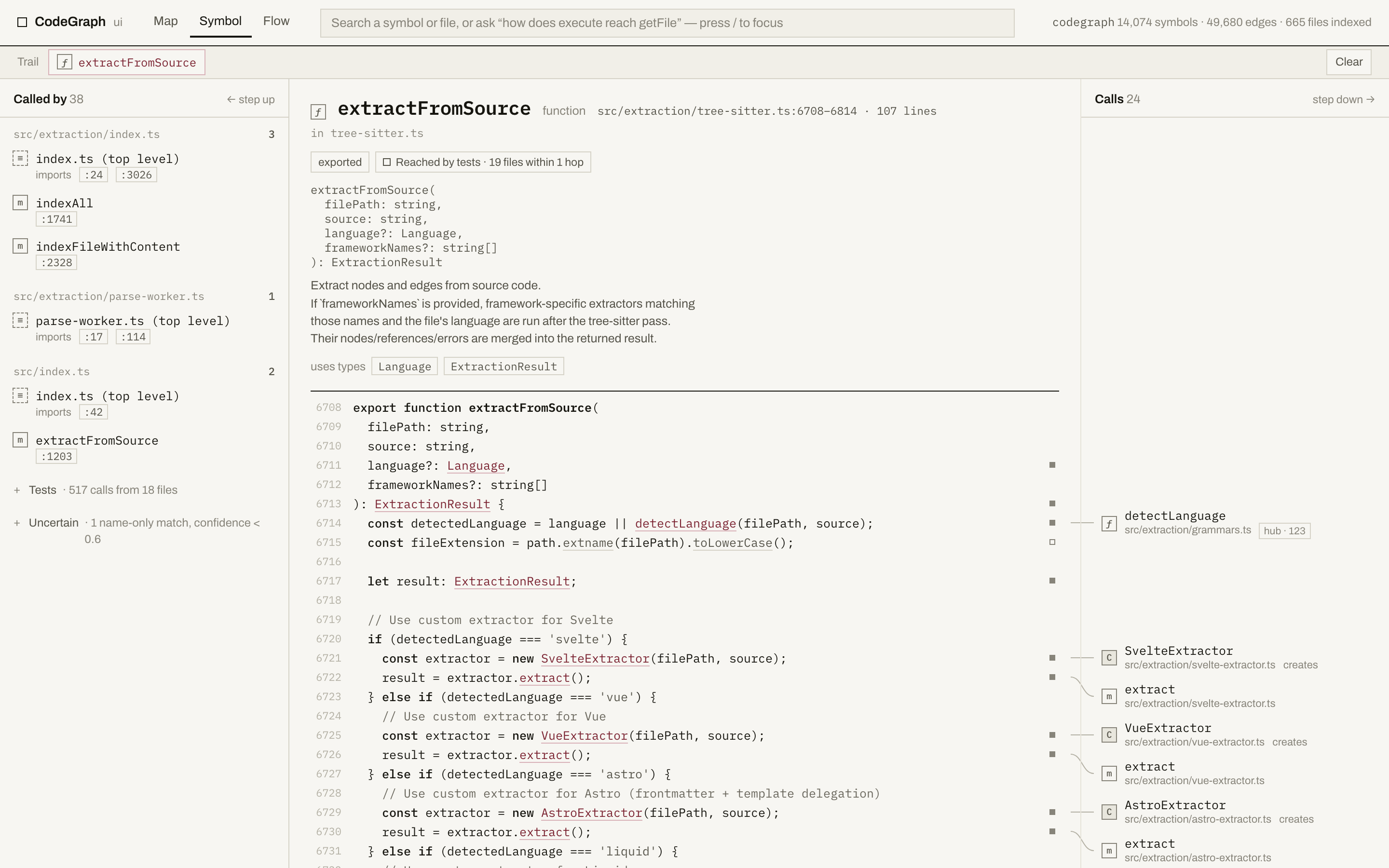 What you get on that screen:
- **Callers, grouped by file**, each with the exact line it calls from — click one to jump there. Test callers fold into a single line so real callers stay in view.
- **The real source**, syntax-highlighted, with a marker in the gutter on every line that calls something.
- **Callees on the right**, positioned at the line that calls them, joined by a hairline. Hover either end and both light up.
- **Blast radius** — direct dependents, everything within three hops, and how many files and test files that touches.
- **Honest edges.** A guess CodeGraph isn't sure about is folded away as "uncertain" rather than shown as fact, and a symbol no test reaches within three hops says so.
- **Search** (`/` or ⌘K) over every symbol and file, **entry points** to start from (routes, hubs, files that run code at import time), and a **trail** of the path you walked that lives in the URL, so you can send someone the exact route you took.
- Click any file path to open the **file view**: everything that file depends on, its outline in source order, and everything that depends on it. Its **Source** tab shows the whole file with the same gutter markers, plus an arc in the left margin for every call that stays inside the file — the one place a file's internal call structure is legible, because source order does the layout. A 6,800-line file scrolls at full speed.
- **Ask for a path.** Type "how does execute reach getFile" (or `execute -> getFile`) and you get the **flow**: one card per hop, each opened at the line that makes the next call. Hops that no static edge records — a callback, an interface dispatch, a React re-render — are drawn dashed and name where the handler was wired. "Read as flow" turns a walk you did by hand into the same strip.
- **The map**: the whole project at module granularity, laid out from the graph with dependencies pointing down — never drawn by hand, and the same picture every time. Cycles are listed rather than straightened away.
- **It keeps up.** Save a file and a banner appears within about a third of a second saying the index hasn't caught up yet — and the screen switches to the file's current source rather than a body sliced at lines it no longer has. When something re-indexes, whatever is on screen refetches itself and says "Index updated · reloaded". A symbol that moved because you added a line above it is followed, not lost. Nothing polls: the viewer watches, and if it loses touch with the server it retries a few times and then says so instead of hammering it.
Options: `--port
What you get on that screen:
- **Callers, grouped by file**, each with the exact line it calls from — click one to jump there. Test callers fold into a single line so real callers stay in view.
- **The real source**, syntax-highlighted, with a marker in the gutter on every line that calls something.
- **Callees on the right**, positioned at the line that calls them, joined by a hairline. Hover either end and both light up.
- **Blast radius** — direct dependents, everything within three hops, and how many files and test files that touches.
- **Honest edges.** A guess CodeGraph isn't sure about is folded away as "uncertain" rather than shown as fact, and a symbol no test reaches within three hops says so.
- **Search** (`/` or ⌘K) over every symbol and file, **entry points** to start from (routes, hubs, files that run code at import time), and a **trail** of the path you walked that lives in the URL, so you can send someone the exact route you took.
- Click any file path to open the **file view**: everything that file depends on, its outline in source order, and everything that depends on it. Its **Source** tab shows the whole file with the same gutter markers, plus an arc in the left margin for every call that stays inside the file — the one place a file's internal call structure is legible, because source order does the layout. A 6,800-line file scrolls at full speed.
- **Ask for a path.** Type "how does execute reach getFile" (or `execute -> getFile`) and you get the **flow**: one card per hop, each opened at the line that makes the next call. Hops that no static edge records — a callback, an interface dispatch, a React re-render — are drawn dashed and name where the handler was wired. "Read as flow" turns a walk you did by hand into the same strip.
- **The map**: the whole project at module granularity, laid out from the graph with dependencies pointing down — never drawn by hand, and the same picture every time. Cycles are listed rather than straightened away.
- **It keeps up.** Save a file and a banner appears within about a third of a second saying the index hasn't caught up yet — and the screen switches to the file's current source rather than a body sliced at lines it no longer has. When something re-indexes, whatever is on screen refetches itself and says "Index updated · reloaded". A symbol that moved because you added a line above it is followed, not lost. Nothing polls: the viewer watches, and if it loses touch with the server it retries a few times and then says so instead of hammering it.
Options: `--port