🌐 English · 中文
# Huashu Design
> *"Type. Hit enter. A finished design lands in your lap."*
> *「打字。回车。一份能交付的设计。」*
[](LICENSE)
[](https://skills.sh)
[](https://skills.sh)
**Say one sentence to your agent — Claude Code, Cursor, Codex, OpenClaw, Hermes all work.**
Thirty seconds later, you have a slide deck, an iOS prototype, a motion-design sequence, or an infographic. Drop it in an issue, paste it into Keynote, ship it to Notion.
It doesn't look like AI made it. Twenty real design philosophies are distilled into the skill (Pentagram's information architecture, Field.io's motion poetics, Kenya Hara's eastern minimalism…). The agent grabs brand assets, builds a design spec, generates HTML, runs Playwright verification, then critiques itself against a 5-dimension rubric.
```
npx skills add alchaincyf/huashu-design
```
[See it work](#demo-gallery) · [Install](#install) · [What it does](#what-it-does) · [How it works](#core-mechanics) · [vs. Claude Design](#vs-claude-design)
> 📖 **Note for English readers**: this skill is built by a Chinese-speaking developer for a Chinese-speaking audience. The skill's agent prompts (`SKILL.md`, `references/*.md`) and all demo assets below are in **Chinese** — they work with English tasks just fine (the agent is bilingual), but the visible text in screenshots/GIFs is Chinese. The core design principles translate universally.
---
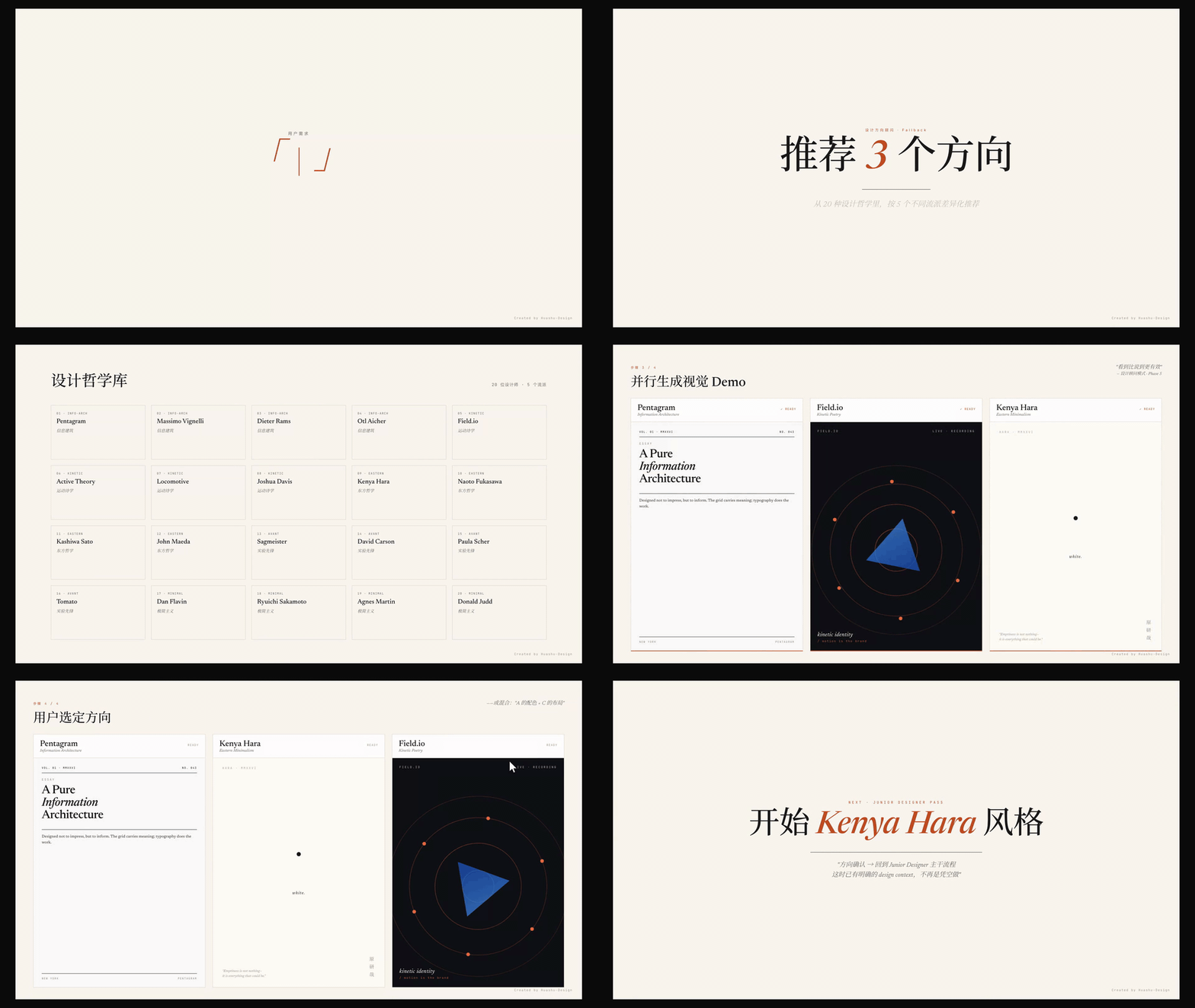
▲ 10-second hero animation showing what huashu-design does (download MP4 if autoplay doesn't work)
---
## Install
```bash
npx skills add alchaincyf/huashu-design
```
Then just talk to Claude Code:
```
"Make a keynote for AI psychology. Give me 3 style directions to pick from."
"Build an iOS prototype for a Pomodoro app — 4 screens, actually clickable."
"Turn this logic into a 60-second animation. Export MP4 and GIF."
"Run a 5-dimension expert review on this design."
```
No buttons, no panels, no Figma plugin. Agent-agnostic — drops into Claude Code, Cursor, Trae, Hermes, OpenClaw, or any markdown-skill-capable agent.
---
## What it does
| Capability | Deliverable | Typical time |
|---|---|---|
| Interactive prototype (App / Web) | Single-file HTML · real iPhone bezel · clickable · Playwright-verified | 10–15 min |
| Slide decks | HTML deck (browser presentation) + editable PPTX (text frames preserved) | 15–25 min |
| Motion design | MP4 (25fps / 60fps interpolation) + GIF (palette-optimized) + BGM | 8–12 min |
| Design variations | 3+ side-by-side · Tweaks live params · cross-dimension exploration | 10 min |
| Infographic / data viz | Print-quality typography · exports to PDF/PNG/SVG | 10 min |
| Design direction advisor | 5 schools × 20 philosophies · 3 directions recommended · Demos generated in parallel | 5 min |
| 5-dimension expert critique | Radar chart + Keep/Fix/Quick Wins · actionable punch list | 3 min |
---
## Demo Gallery
> The demos below use Chinese text in UI but the mechanics apply to any language.
### Design Direction Advisor
The fallback for vague briefs: pick 3 differentiated directions from 5 schools × 20 philosophies, generate all 3 demos in parallel, let the user choose.
### iOS App Prototype
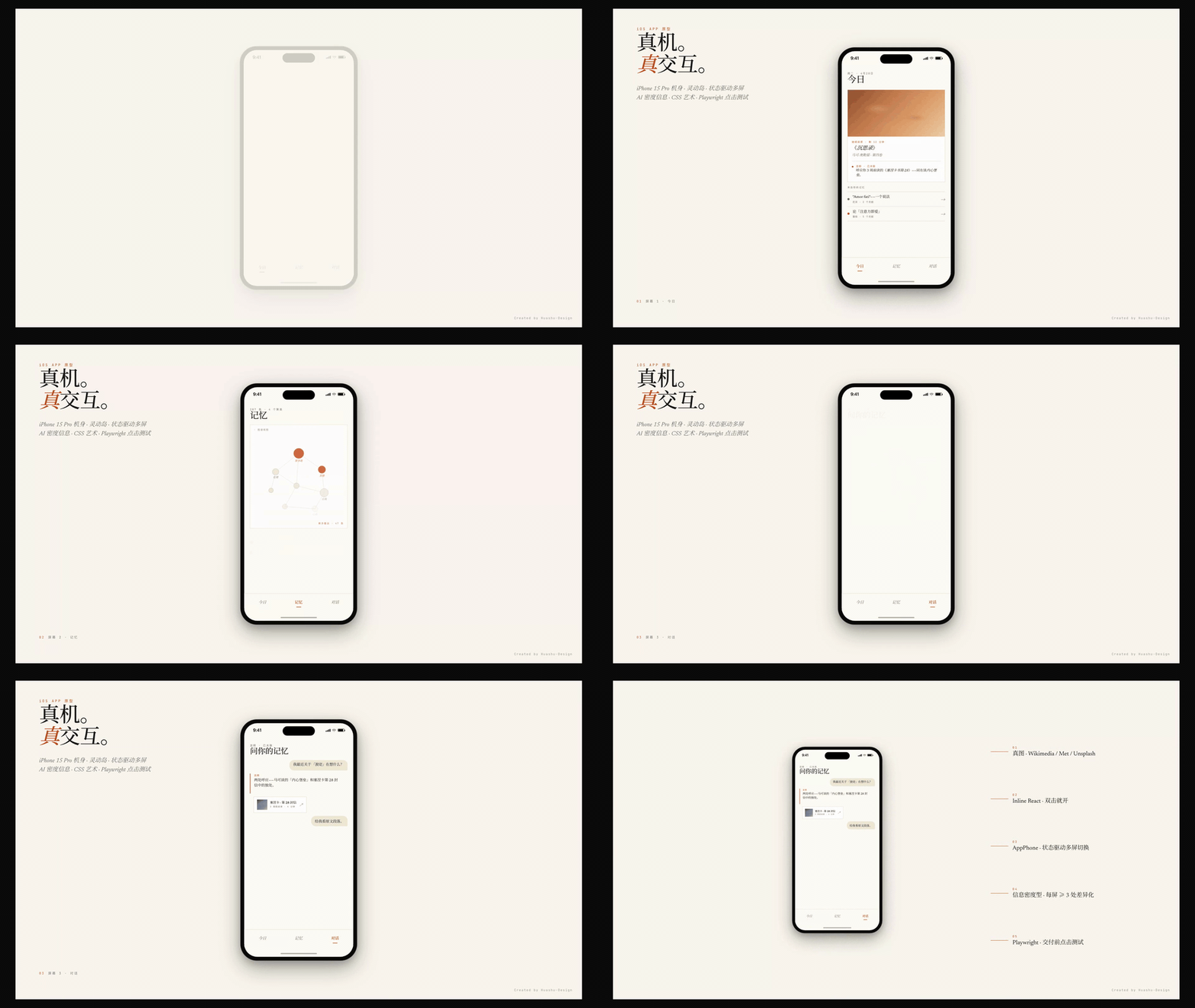
Pixel-accurate iPhone 15 Pro body (Dynamic Island / status bar / Home Indicator) · state-driven multi-screen navigation · real images pulled from Wikimedia/Met/Unsplash · Playwright click tests before delivery.
### Motion Design Engine
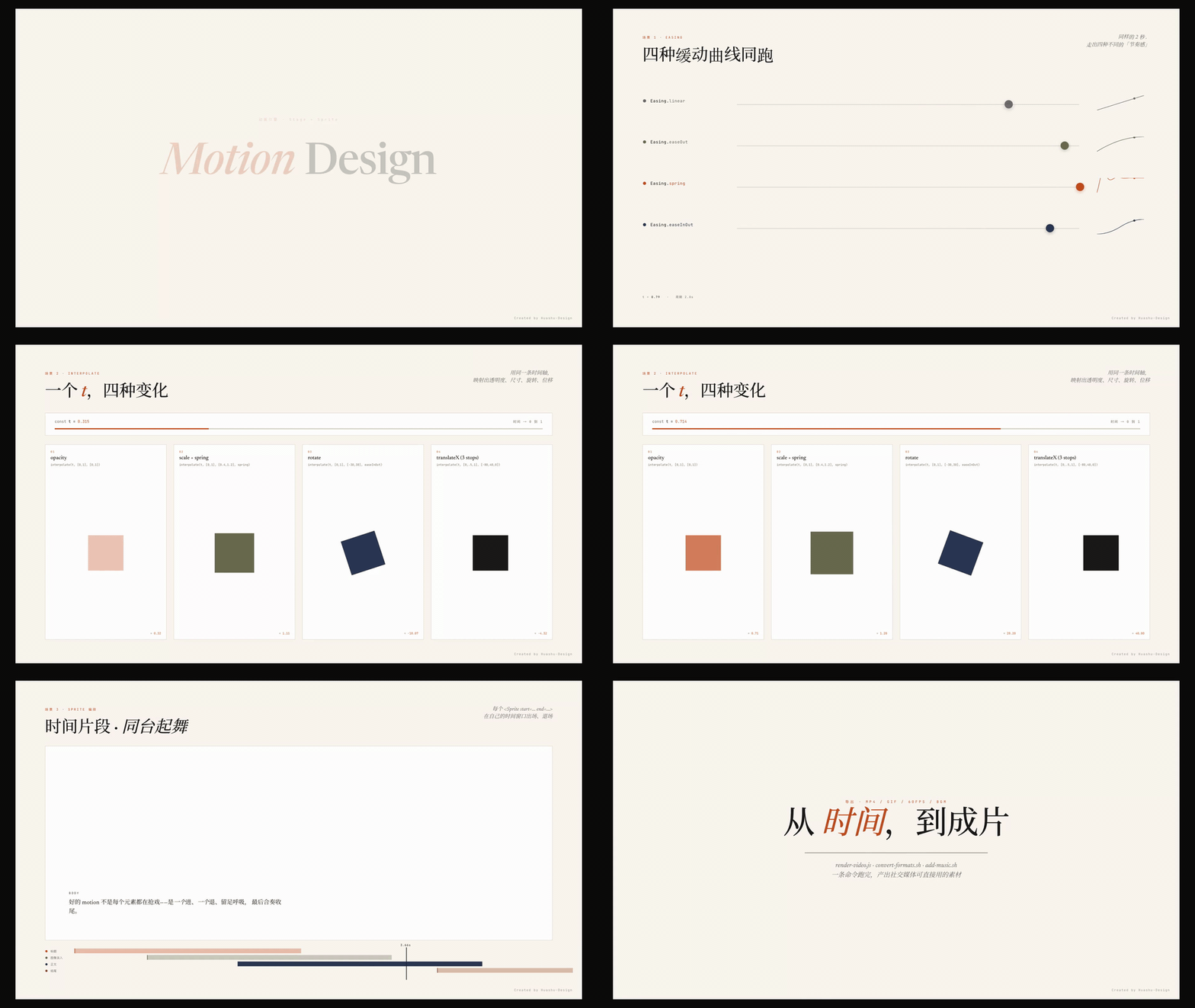
Stage + Sprite time-slice model · `useTime` / `useSprite` / `interpolate` / `Easing` — four APIs cover every animation need · one command exports MP4 / GIF / 60fps-interpolated / BGM-scored finals.
### HTML Slides → Editable PPTX
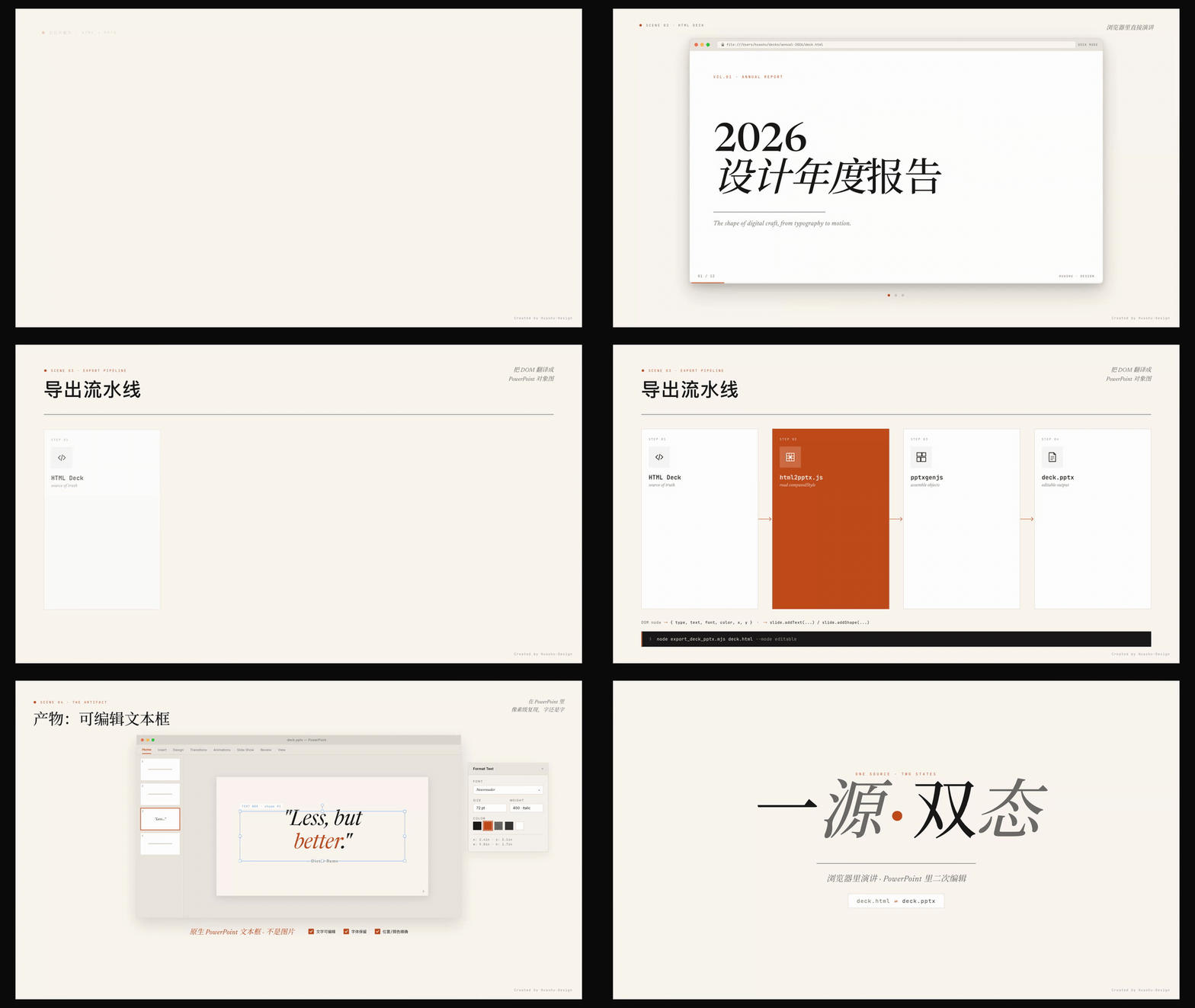
HTML decks for browser presentation · `html2pptx.js` reads DOM computed styles and translates each element into real PowerPoint objects · exports are **actual text frames**, not image-bed fakes.
### Tweaks · Live Variation Switching
Colors / typography / information density parameterized · side panel toggle · pure-frontend + `localStorage` persistence · survives reload.

### Infographic / Data Viz
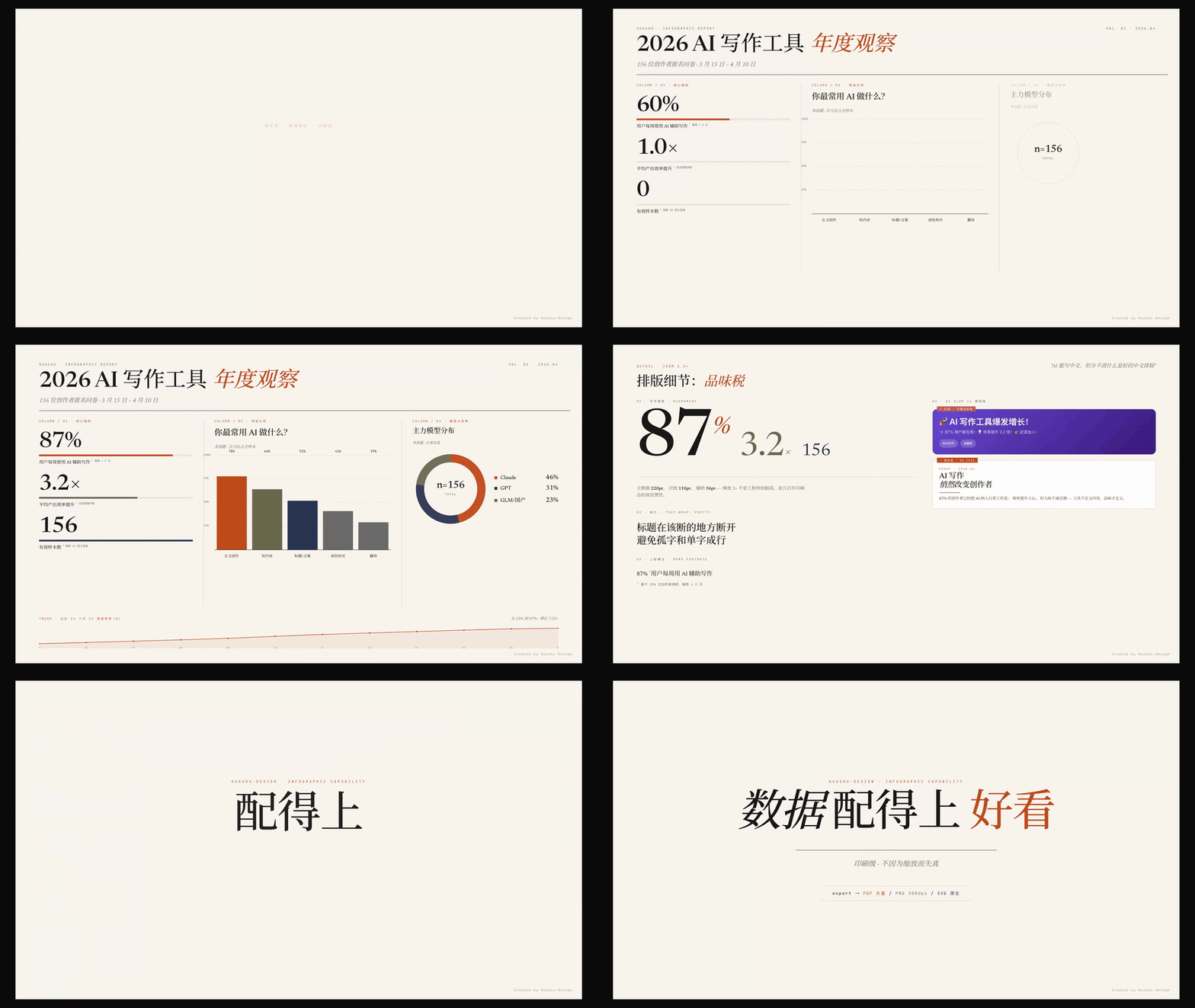
Magazine-grade typography · precise CSS Grid columns · `text-wrap: pretty` typographic details · driven by real data · exports to vector PDF / 300dpi PNG / SVG.
### 5-Dimension Expert Critique
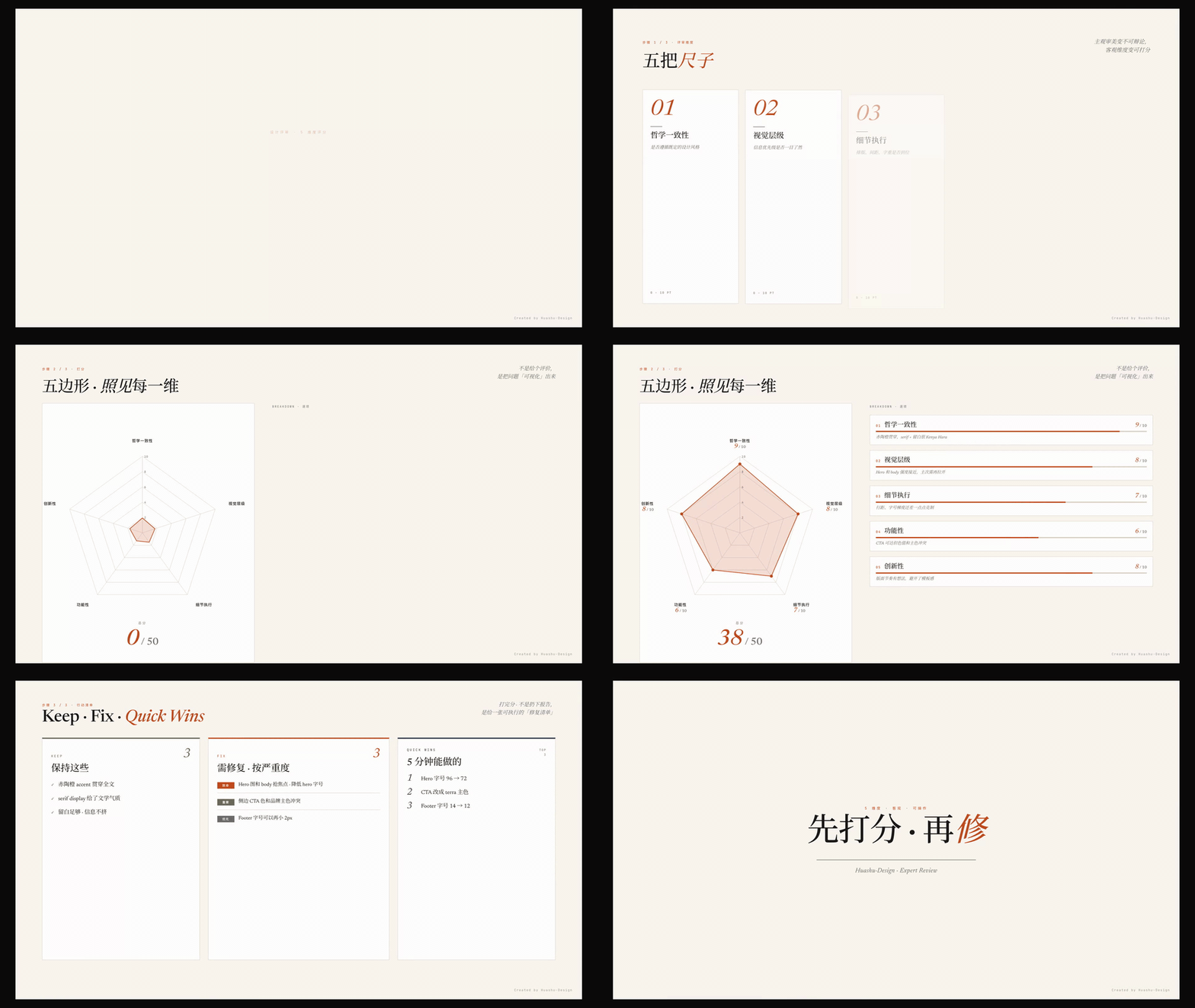
Philosophical coherence · visual hierarchy · execution craft · functionality · innovation — each scored 0–10 · radar-chart visualization · outputs Keep / Fix / Quick Wins punch list.
### Junior Designer Workflow
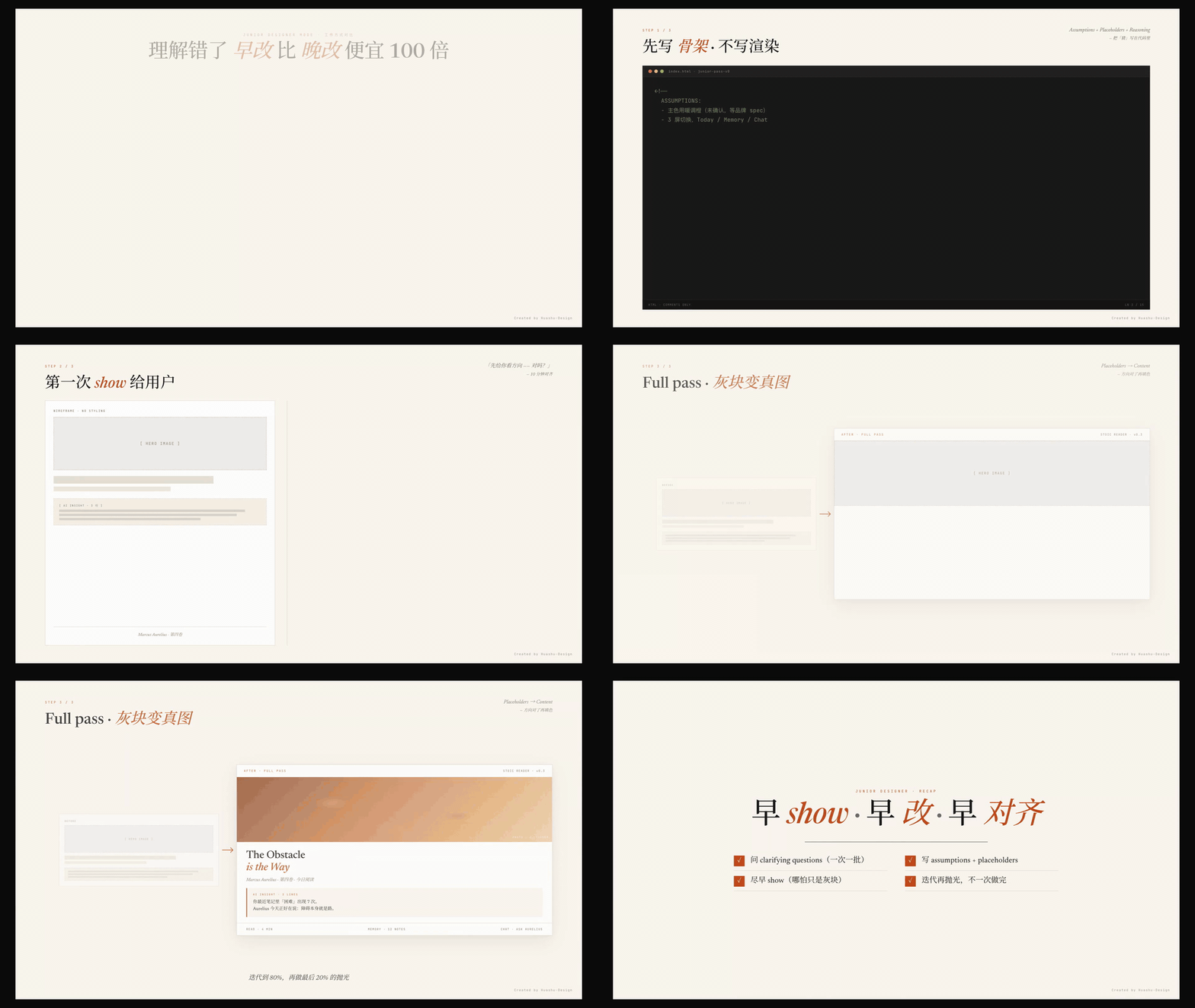
No heroic one-shot attempts: start with assumptions + placeholders + reasoning, show it to the user early, then iterate. Fixing a misunderstanding early is 100× cheaper than fixing it late.
### Core Asset Protocol · 5-step hard process
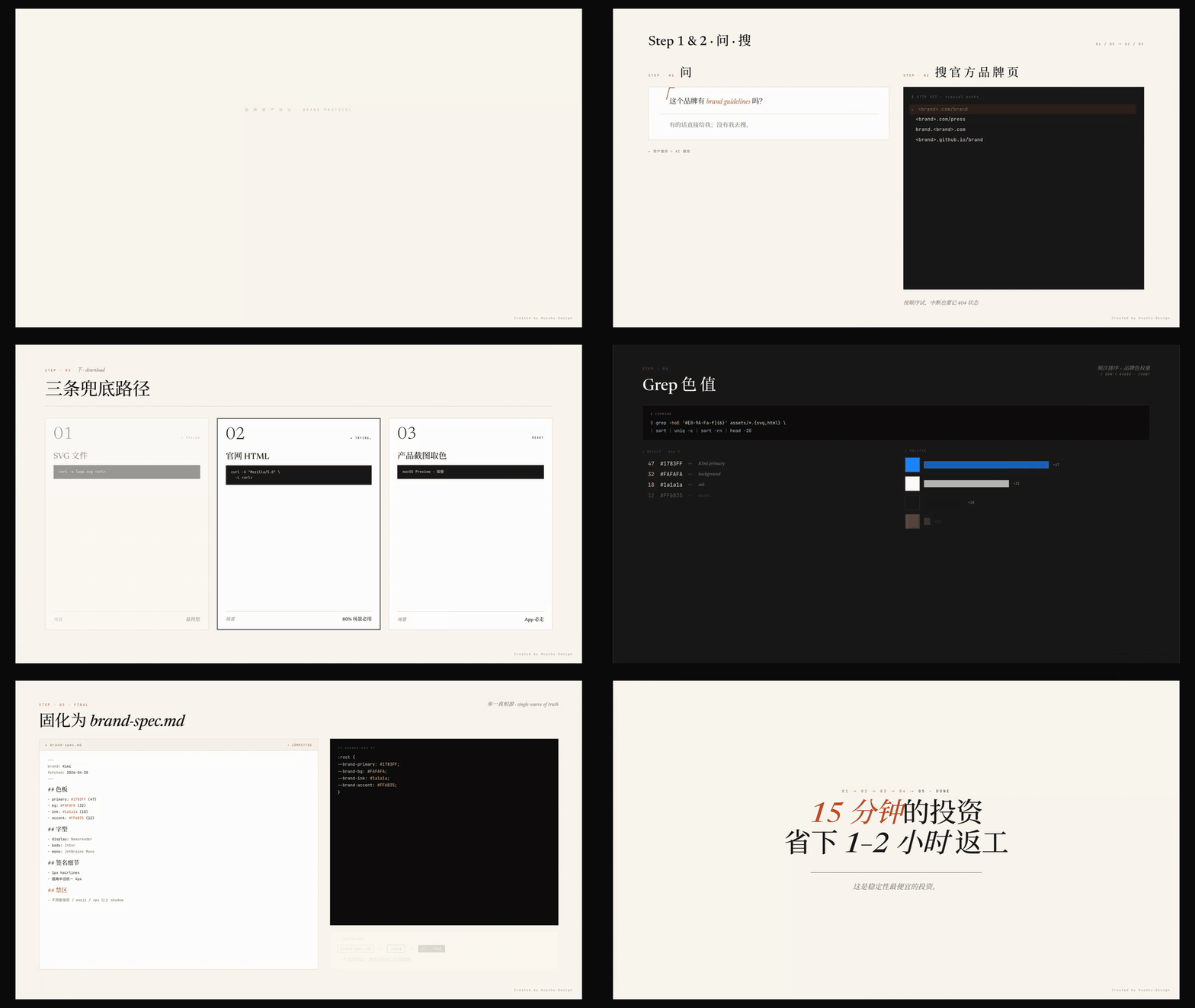
Mandatory whenever the task involves a specific brand: ask → search → download (three fallback paths) → verify + extract → write `brand-spec.md` covering **logo, product shots, UI screenshots, colors, fonts** — all required assets, not just colors.
---
## Core Mechanics
### Core Asset Protocol
The hardest rule in the skill. When the task touches a specific brand (Stripe, Linear, Anthropic, DJI, your own company, etc.), five steps are enforced:
| Step | Action | Purpose |
|---|---|---|
| 1 · Ask | Checklist of 6 asset types: logo / product shots / UI screenshots / color palette / fonts / brand guidelines | Respect existing resources |
| 2 · Search official channels | `.com/brand` · `.com/press` · `brand..com` · product pages · launch films | Find authoritative assets |
| 3 · Download by asset type | Logo (SVG → inline-SVG in HTML → social avatar) · Product shots (hero → press kit → launch video frames → AI-generated from reference) · UI (App Store screenshots → official video frames) | Three fallback paths per asset type |
| 4 · Verify + extract | Check logo fidelity · product image resolution · UI freshness · grep color hex from real assets | **Never guess from memory** |
| 5 · Freeze to spec | Write `brand-spec.md` with logo paths, product image paths, UI screenshot paths, CSS variables for colors/fonts | Un-frozen knowledge evaporates |
**Ranking of asset importance** (from the skill's internal rubric):
1. Logo — mandatory for any brand
2. Product renders — mandatory for physical products
3. UI screenshots — mandatory for digital products
4. Color values — auxiliary
5. Fonts — auxiliary
A/B-tested (v1 vs v2, 6 agents each): **v2 reduced stability variance by 5×**. Stability of stability — that's the real moat.
### Design Direction Advisor (Fallback)
Triggered when the brief is too vague to execute:
- Don't run on generic intuition — enter Fallback mode
- Recommend 3 differentiated directions from 5 schools × 20 philosophies, each **from a different school**
- Each comes with flagship works, gestalt keywords, representative designer
- Generate 3 visual demos in parallel, let the user choose
- Once chosen, continue into the Junior Designer main flow
### Junior Designer Workflow
The default working mode across every task:
- Send the full question set in one batch, wait for all answers before moving
- Write assumptions + placeholders + reasoning comments directly into the HTML
- Show it to the user early (even if just gray blocks)
- Fill in real content → variations → Tweaks — show at each of these three steps
- Manually eyeball the browser with Playwright before delivery
### Fact Verification First (Principle #0)
The highest-priority rule, added after a real failure mode: when the task mentions a specific product / technology / event (e.g., "DJI Pocket 4", "Nano Banana Pro", "Gemini 3 Pro"), the first action **must** be a `WebSearch` to confirm existence, release status, current version, and specs. No claims from training-corpus memory. Cost of a search: ~10 seconds. Cost of a wrong assumption: 1–2 hours of rework.
### Anti AI-slop Rules
Avoid the visual common denominator of AI output (purple gradients / emoji icons / rounded-corner + left border accent / SVG humans / Inter-as-display / **CSS silhouettes standing in for real product shots**). Use `text-wrap: pretty` + CSS Grid + carefully chosen serif display faces + oklch colors.
---
## vs. Claude Design
I'll be upfront: the Core Asset Protocol's philosophy was lifted from system prompts Anthropic wrote for Claude Design. That prompt hammers home a single idea — **great hi-fi design doesn't start from a blank page, it grows from existing design context**. That one principle is the difference between a 65-point design and a 90-point design.
Positioning differences:
| | Claude Design | huashu-design |
|---|---|---|
| Form | Web product (used in browser) | Skill (used in Claude Code) |
| Quota | Subscription quota | API usage · parallel agents unblocked |
| Output | Canvas + Figma export | HTML / MP4 / GIF / editable PPTX / PDF |
| Interaction | GUI (click, drag, edit) | Conversation (tell agent, wait) |
| Complex animation | Limited | Stage + Sprite timeline · 60fps export |
| Agent compatibility | Claude.ai only | Claude Code / Cursor / Trae / Hermes / OpenClaw |
Claude Design is a **better graphics tool**. Huashu-design makes **the graphics-tool layer disappear**. Two paths, different audiences.
---
## Limitations
- **No layer-editable PPTX-to-Figma round-trip.** The output is HTML — screenshottable, recordable, image-exportable, but not draggable into Keynote for text-position tweaks.
- **Framer-Motion-tier complex animations are out of scope.** 3D, physics simulation, particle systems exceed the skill's boundaries.
- **Brand-from-zero design quality drops to 60–65 points.** Drawing hi-fi from nothing was always a last resort.
This is an 80-point skill, not a 100-point product. For people unwilling to open a graphical UI, an 80-point skill beats a 100-point product.
---
## Repository Structure
```
huashu-design/
├── SKILL.md # Main doc (read by agent, Chinese)
├── README.md # Chinese README (default)
├── README.en.md # English README (this file)
├── assets/ # Starter Components
│ ├── animations.jsx # Stage + Sprite + Easing + interpolate
│ ├── ios_frame.jsx # iPhone 15 Pro bezel
│ ├── android_frame.jsx
│ ├── macos_window.jsx
│ ├── browser_window.jsx
│ ├── deck_stage.js # HTML deck engine
│ ├── deck_index.html # Multi-file deck assembler
│ ├── design_canvas.jsx # Side-by-side variation display
│ ├── showcases/ # 24 prebuilt samples (8 scenes × 3 styles)
│ └── bgm-*.mp3 # 6 scene-specific background tracks
├── references/ # Drill-down docs by task (Chinese)
│ ├── animation-pitfalls.md
│ ├── design-styles.md # 20 design philosophies in detail
│ ├── slide-decks.md
│ ├── editable-pptx.md
│ ├── critique-guide.md
│ ├── video-export.md
│ └── ...
├── scripts/ # Export toolchain
│ ├── render-video.js # HTML → MP4
│ ├── convert-formats.sh # MP4 → 60fps + GIF
│ ├── add-music.sh # MP4 + BGM
│ ├── export_deck_pdf.mjs
│ ├── export_deck_pptx.mjs
│ ├── html2pptx.js
│ └── verify.py
└── demos/ # Capability demos referenced by this README
```
---
## Origin Story
The day Anthropic launched Claude Design I played with it until 4 a.m. A few days later I realized I hadn't opened it once since — not because it's bad (it's the most polished product in the category) but because I'd rather have an agent work in my terminal than open any graphical UI.
So I had an agent deconstruct Claude Design itself (including the system prompts circulating in the community, the brand asset protocol, the component mechanics), distill it into a structured spec, then write it as a skill installed in my own Claude Code.
Thanks to Anthropic for writing the Claude Design prompts so clearly. This kind of derivative work inspired by other products is the new form of open-source culture in the AI era.
---
## License · Usage Rights
**Personal use is free and unrestricted** — studying, research, creating things for yourself, writing articles, side projects, personal social media. Use it freely, no need to ask.
**Enterprise / commercial use is restricted** — any company, team, or for-profit organization integrating this skill into a product, external service, or client deliverable **must obtain authorization from Huasheng first**. Including but not limited to:
- Using the skill as part of internal company tooling
- Using skill outputs as the primary creative method for external deliverables
- Building a commercial product on top of the skill
- Using it in paid client projects
**Commercial licensing contact**: any of the social platforms below.
---
## Connect · Huasheng (Huashu)
Huasheng is an AI-native coder, independent developer, and AI content creator. Notable work: Cat Fill Light (App Store Top 1 in Paid category), *A Book on DeepSeek*, Nüwa.skill (GitHub 12k+ stars). Combined 300k+ followers across platforms.
| Platform | Handle | Link |
|---|---|---|
| X / Twitter | @AlchainHust | https://x.com/AlchainHust |
| WeChat Official Account | 花叔 | Search "花叔" in WeChat |
| Bilibili | 花叔 | https://space.bilibili.com/14097567 |
| YouTube | 花叔 | https://www.youtube.com/@Alchain |
| Xiaohongshu | 花叔 | https://www.xiaohongshu.com/user/profile/5abc6f17e8ac2b109179dfdf |
| Official Site | huasheng.ai | https://www.huasheng.ai/ |
| Developer Hub | bookai.top | https://bookai.top |
For commercial licensing, collaborations, or sponsored content, DM on any of the above.